Undo Pick with License Plate
Standard Business Central does not provide a feature to undo a registered warehouse pick. If the picked goods are no longer needed for a shipment, you need a way to reverse the pick and make them available for picking again.
The Undo Pick with License Plate feature allows to reverse the pick for selected license plates and release their links to the original warehouse shipment. The license plates can then be picked again, including for a different shipment.
This feature is available only for registered picks with associated license plates. For registered picks without license plates, use the Undo Pick feature available in Theta's Advanced Sales app.
How to undo a pick
On the registered pick, choose Undo Pick with License Plate.
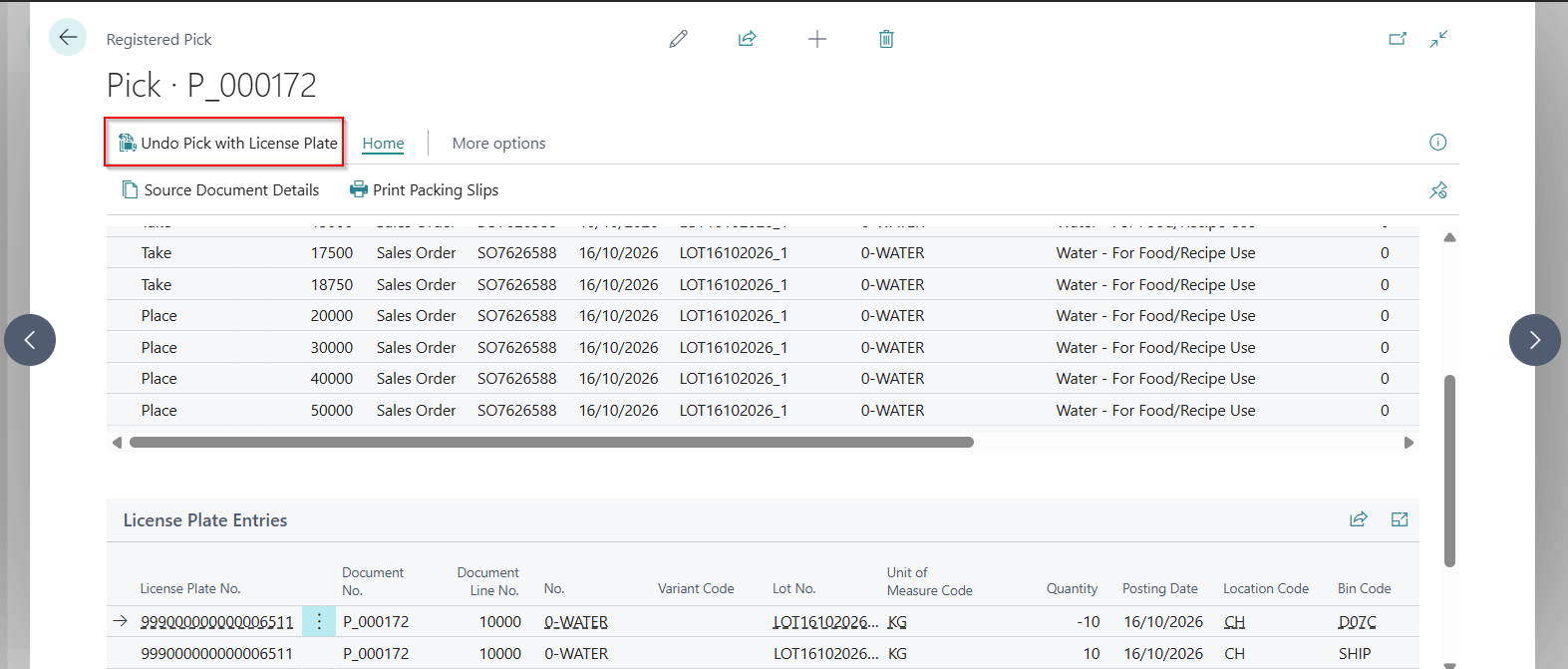
Select the license plates on the Undo Pick - Select License Plates page, then choose Undo Pick. The confirmation shows how many registered pick lines will be undone. If this is more than you selected, it explains why. Confirm to continue.
The stock stays in the shipping bin. Move it back separately if required, for example, by using Freight Pallet Tasklet function.
Selecting license plates
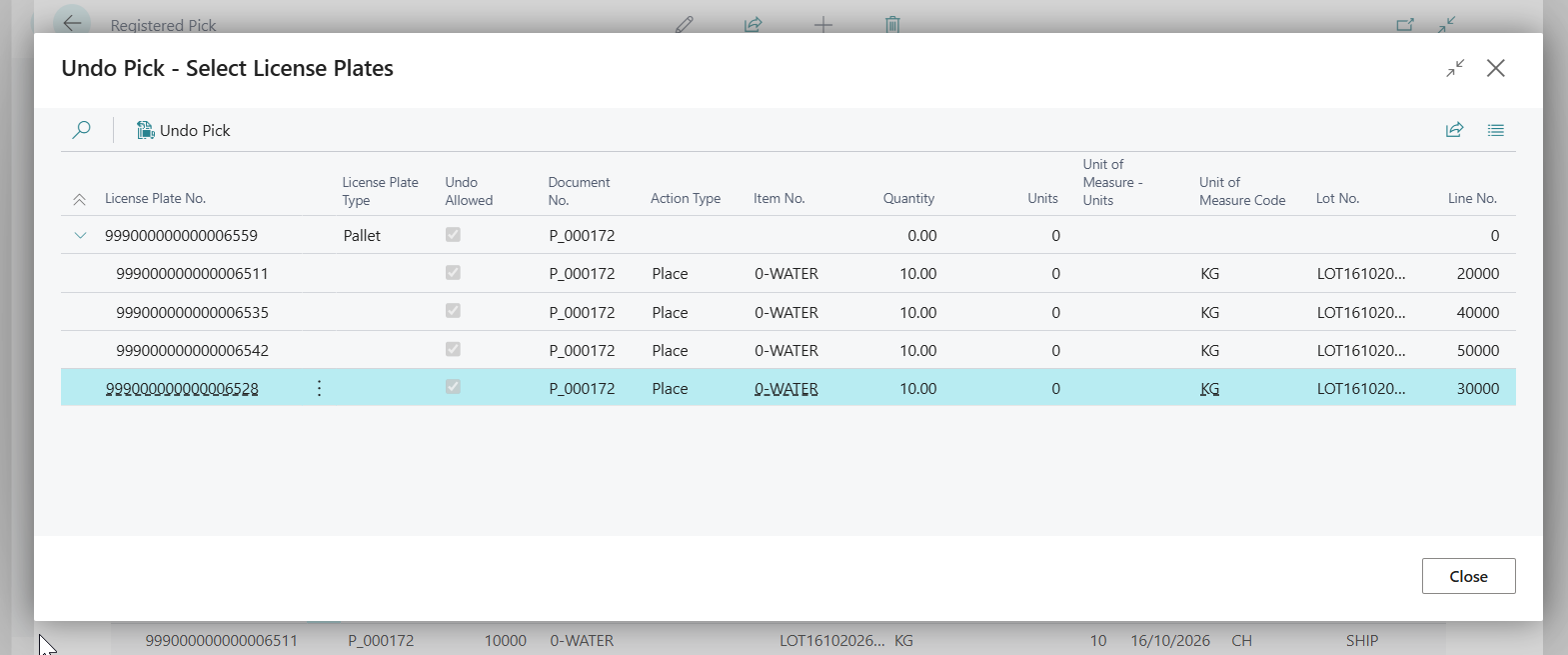
- Selecting a parent license plate selects all license plates below it. Child license plates are shown indented beneath their parent.
- Selecting any item line of a license plate undoes the pick for all its picked items. This includes lines picked for different warehouse shipment lines: if one license plate was picked for three shipment lines, selecting one of the three lines undoes all three.
- A child license plate cannot be undone while it remains in a parent with other picked license plates unless all of them are selected. Select the parent to undo the whole pallet, or move the required license plates out first using Freight Pallet Tasklet function.
- The Undo Allowed toggle shows whether the pick for a line can still be undone. Lines where it is cleared are shown in grey and cannot be undone, because the pick was already undone, the license plate was shipped, or the license plate no longer exists.
- Up to two parent levels are supported, such as a pallet containing intermediate parent license plates that contain cartons.
When the undo is blocked
You receive an error if a selected license plate has already been shipped, its pick has already been undone, the related warehouse shipment line has been deleted, or the selection leaves other picked license plates in the same parent.
If the status of a license plate was already reset with standard Tasklet action Reset Status, you cannot use Undo Pick with License Plate for it. The reset breaks the link between the license plate and the warehouse shipment, so the feature treats its pick as already undone. Use Undo Pick with License Plate instead of Reset Status when you need to reverse a pick, because Reset Status does not reverse the picked quantities on the warehouse shipment line and the registered pick.
The undo is all or nothing: if any selected line fails a check, nothing is changed. You must select at least one license plate. The selection page does not open if the registered pick has no associated license plates or all of them have been shipped.
Partial shipments
When a warehouse shipment has license plates, Qty. to Ship must match the picked quantity. Posting is blocked if these quantities differ.
To ship less, use Undo Pick with License Plate for the license plates you no longer wish to ship, then post the shipment.
Technical details
For each selected license plate the pick is reversed:
- The picked quantity and the quantity to ship on the warehouse shipment line are reduced.
- Item tracking and reservations created for the pick are released.
- Reversing lines are added to the registered pick.
- The shipping status and the warehouse document of the license plate are cleared, so the license plate can be picked again.
- The license plate entries written when the items were picked are marked as Reversed.