Consignment Inventory
Consignment Inventory lets you hold vendor-owned inventory in Microsoft Dynamics 365 Business Central and pay for it only when you use it. It tracks every unit received on consignment, recognises the liability the moment the inventory is used, and creates draft purchase invoices from actual usage whenever you choose to invoice.
Business Value
Organisations holding consignment inventory often do a lot of manual work to track which consignment inventory has been used, so they can report usage to their vendors accurately and pay the right amount. Some vendors also require consignment inventory that is not used within a set period to be returned or invoiced. Consignment Inventory removes that work. It accounts for usage as it happens, so you always know where you stand with each vendor, and it prepares the invoices for you.
What the App Does for You
Track Consignment Inventory Accurately
- Know your position at any point in the month. At any time, you can see how much inventory is on consignment and how much has been used and is due to be invoiced, by vendor, item and receipt.
- Receive consignment inventory at its expected cost, so anything that consumes it carries a realistic cost.
- Keep the balance sheet clean. A consignment receipt has no net effect on your assets, because you don't own the inventory yet.
- Recognise usage automatically. When consignment inventory is sold, consumed, adjusted out or transferred out, the app records it as used and posts the liability to your vendor. Its own account, Consignment Used Not Invoiced, always shows what you owe for consignment inventory used, separately from your normal GRNI.
- Correct mistakes cleanly. Reversing a usage, such as a sales return into the consignment location, puts the inventory back on consignment and reverses the liability.
Invoice from Usage, When You Choose
- Draft invoices are created automatically. A batch job creates purchase invoices for exactly what was used, priced from the original purchase order. One invoice is created per vendor.
- Invoice whenever you want to. Run invoicing weekly, at month end, or on demand for a single vendor. You choose the date that usage is invoiced up to.
- Works with how your vendors bill you. The draft invoice supports both common arrangements:
- Buyer-created tax invoices (recipient-created tax invoices in Australia): where your agreement allows it, you issue the tax invoice to the vendor from the draft and post it.
- Usage reporting: send the draft to the vendor as a statement of usage. The vendor raises their own invoice, and you use the draft to check and process it.
- No overbilling. You can only invoice consignment inventory that has been used.
How It Works
Consignment inventory costs you nothing until it is used. Usage, not receipt, puts the liability on your books and drives the vendor invoice.
Consignment inventory goes through standard Business Central costing and cost posting, exactly like inventory you own. It is received at expected cost, valued by the item's costing method, adjusted by Adjust Cost - Item Entries, and posted to the G/L by the normal cost posting. Nothing about costing is replaced.
What keeps it off your balance sheet is the posting setup. Consignment receipts post to dedicated consignment accounts (Consignment Inventory, Consignment Interim Accrual and Consignment Purchase Variance) that always net each other off. Only when inventory is used does the app move its value to Consignment Used Not Invoiced, so the liability is recognised.
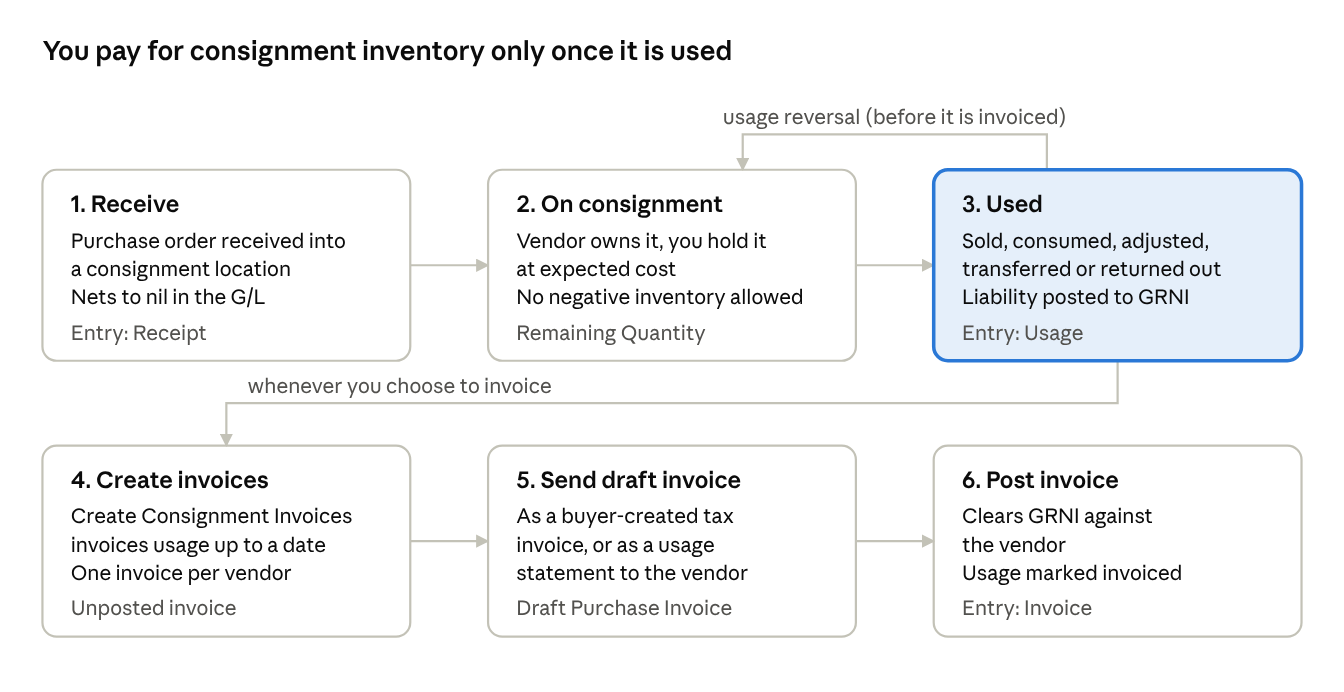
The G/L follows the same path:
| Stage | What happens in the G/L |
|---|---|
| Receipt | The inventory is posted to Consignment Inventory at expected cost, offset by Consignment Interim Accrual. The two accounts cancel out, so your assets don't change. |
| Usage | The usage posts its normal entry, for example cost of goods sold on a sale. The app then moves the value from Consignment Interim Accrual to Consignment Used Not Invoiced, so the vendor liability is now recognised. |
| Invoice | The vendor invoice clears Consignment Used Not Invoiced against the vendor. |
The app tracks each purchase receipt line on its own. When inventory is used, the usage is matched to the receipt it came from, so the invoice uses that receipt's price and purchase order. Standard-cost items work the same way, with the purchase variance carried through Consignment Purchase Variance. This requires Purchase Accruals to calculate the variance on receipt.
Key Terms
| Term | Meaning |
|---|---|
| Consignment location | A location set up for consignment inventory. Everything received into it is treated as vendor-owned until used. You can have several. |
| Related location | The physical location a consignment location sits in, such as the warehouse that holds the inventory. Information only. |
| Usage | Any posting that reduces inventory in a consignment location: sale, consumption, assembly consumption, negative adjustment, purchase return or transfer out. |
| Usage reversal | A posting that brings used inventory back into the consignment location, applied to the original usage. |
| Interim posting | The G/L posting that moves the value of used inventory from Consignment Interim Accrual to Consignment Used Not Invoiced, which recognises the liability. |
| Consignment ledger entry | The app's own record of every receipt, usage, reversal and invoice, by vendor receipt line. |
| Draft purchase invoice | A printable or emailable invoice created from usage. You send it to the vendor either as a buyer-created tax invoice or as a statement of usage to check their invoice against. |
Before You Start
- Purchase Accruals must be installed. Consignment Inventory depends on it, but you don't need to set up or use accruals unless you want them. If you don't want to use Purchase Accruals, select its Companion subscription plan. If you receive standard-cost items on consignment, you must use Purchase Accruals, because it calculates the purchase variance on receipt.
- Automatic Cost Posting must be on in Inventory Setup if you want the usage postings to happen automatically (recommended).