Currency Exchange Rate Feed
Feature Details
Eliminate manual currency rate entry and ensure consistency across your entire organisation. The Currency Exchange Rate Management extension automatically fetches and distributes daily exchange rates to all companies in your Business Central environment.
This extension does not include or provide an exchange rate provider. It provides a mechanism for connecting to third-party currency exchange rate services.
- No Service Guarantee: While FloatRates is currently free, we cannot guarantee the ongoing availability or pricing of any third-party provider
- Third-Party Dependencies: All exchange rate data comes from external services that we do not control
- Extensibility: The extension can connect to other currency providers that support XML or JSON formats, though this may require custom development
How This Extends Business Central's Built-In Functionality
What Business Central Already Provides
Business Central includes a standard Currency Exchange Rate Service that can:
- Connect to currency providers like FloatRates
- Fetch daily exchange rates automatically
- Update the Currency Exchange Rate table
What This Extension Adds
This extension enhances the standard functionality with enterprise-level features:
| Feature | Standard BC | This Extension |
|---|---|---|
| Fetch Rates | ✅ Per company | ✅ Once for all companies |
| Multi-Company Consistency | ❌ Each company fetches independently | ✅ All companies share identical rates |
| Snapshot History | ❌ No staging or review | ✅ Complete audit trail with snapshots |
| Rate Verification | ❌ Rates apply immediately | ✅ Review before applying (optional) |
| Historical Fetch | ❌ Limited | ✅ Fetch rates for any past date |
| API Efficiency | ❌ Multiple API calls per day | ✅ One API call shared across companies |
| Audit Trail | ❌ Basic change log | ✅ Detailed application logs per company |
| Provider Extensibility | ❌ Fixed providers | ✅ Add custom providers via events |
Why This Matters for Multi-Company Environments
The Challenge: With standard BC, if you have 10 companies, each company independently fetches rates. This can result in:
- 10 API calls for the same data
- Slight timing differences causing rate inconsistencies between companies
- No easy way to verify all companies are using identical rates
The Solution: This extension fetches once, stores in a shared snapshot, and distributes the same rates to all companies—guaranteed consistency with one API call.
💡 Note: You can still use Business Central's standard currency service alongside this extension. Enable "Use Standard Currency Config" in the setup to run both.
Why Your Business Needs This
The Multi-Company Challenge
Even with Business Central's standard currency service, multi-company organisations face challenges:
- Timing Gaps: Companies fetch at different times, potentially getting different rates
- No Verification: Rates apply immediately without review opportunity
- Limited Audit: No snapshot history of what was fetched when
- API Waste: Multiple companies = multiple API calls for identical data
How This Extension Solves It
- ⏱️ Time Savings: Automated daily rate updates eliminate manual entry
- 🌍 Organisation-Wide Consistency: All companies use identical rates
- 📊 Audit Compliance: Complete history of rate applications with timestamps
- 🔐 Enterprise Security: Encrypted API credential storage
- 🚀 Zero Maintenance: Set it once, runs automatically forever
Real-World Benefits
- Multi-Company Operations: Process intercompany transactions with confidence knowing all entities use the same rates
- Month-End Close: Skip rate verification—rates are guaranteed consistent
- Global Teams: Local offices see the same rates as headquarters
- Regulatory Compliance: Automatic time-stamped audit trail for all rate changes
Getting Started (5-Minute Setup)
What You Get Out of the Box
After installation, two currency providers are automatically configured and ready to use:
✅ FloatRates-API (Recommended for Quick Start)
- No signup required - Works immediately
- 145+ currencies supported
- Free forever
- Historical rate support
⚡ ExchangeRate-API (Premium Option)
- Free tier available at exchangerate-api.com
- 165+ currencies
- Faster response times
- Requires free API key
Step 1: Choose Your Provider (1 minute)
- Search for "Currency Providers" in Business Central
- Open either provider card
- For FloatRates: Skip to Test Connection
- For ExchangeRate-API: Click "Setup" → Enter your API key
- Click "Test Connection" to verify it works

💡 Tip: Start with FloatRates-API for instant setup. You can switch providers anytime.
Step 2: Configure Your Company (2 minutes)
- Search for "Currency Provider Setup"
- Select your Currency Provider from the dropdown
- Leave Last Updated Date blank (fetches today's rates)
- Click "Fetch Rates" to get your first set of rates
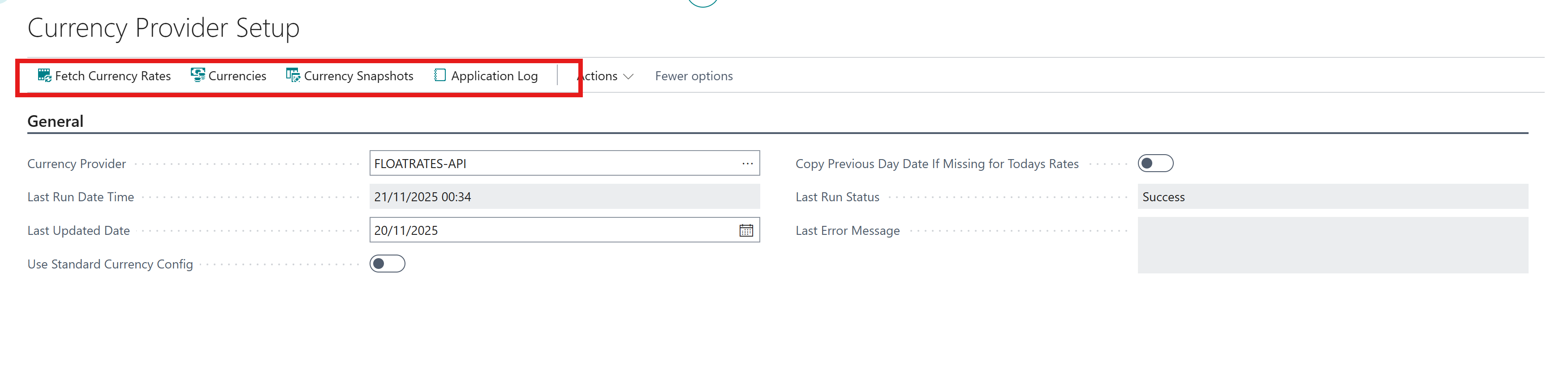
That's it! The system now automatically fetches rates daily.
Step 3: Understand the Options
Your setup page has these key settings:
Currency Provider (Required)
- Which service to use for rate fetching
Last Updated Date (Optional)
- Leave blank = Today's rates (recommended)
- Set a past date = Historical rates (FloatRates only)
Copy Previous Day If Missing (Helpful for Weekends)
- Automatically uses Friday's rates if Saturday/Sunday rates aren't available
- Perfect for businesses operating on weekends
Use Standard Currency Config (Advanced)
- Enables Business Central's built-in currency service
- Requires additional configuration
Status Fields (Read-Only)
- Monitor last successful update
- View any error messages
What Happens Next?
Once configured:
- ✅ Daily job queue automatically created
- ✅ Rates fetched every day before business hours
- ✅ All companies in your environment get the same rates
- ✅ Complete history maintained for auditing
- ✅ Zero ongoing maintenance required
How It Works Behind the Scenes
The Smart Fetch Process
When the daily job runs, here's what happens:
- Check First: System checks if today's rates were already fetched
- Fetch Once: If not, fetches rates from your chosen provider
- Store Centrally: Rates saved in a shared location (called a "snapshot")
- Apply to All: Each company automatically gets these same rates
- Log Everything: Complete record kept for audit purposes
Why This Matters
Efficiency: If Company A fetches rates at 8 AM, Companies B, C, and D simply use those rates—no duplicate API calls.
Consistency: All companies are guaranteed to have identical rates because they all use the same snapshot.
History: Every rate fetch is preserved, so you can see exactly what rates were used on any given day.
Understanding Snapshots (For Power Users)
What Are Snapshots?
Think of snapshots as a "saved copy" of exchange rates for a specific day. They serve as:
- Audit records of what rates were retrieved
- Shared storage across all companies
- Review points before rates go live (optional)
Viewing Snapshot History
Search for "Currency Snapshot Data" to see:
- Date: When rates were fetched
- Provider: Which service provided the rates
- Currencies: All currency pairs and their rates
For Developers: Extensibility
Adding Custom Currency Providers
The extension uses event-driven architecture, allowing you to add custom currency providers without modifying the base extension.
When You Need to do This
- Your organisation uses a specific currency provider not included out-of-the-box
- You need to fetch rates from internal systems or proprietary APIs
- You have custom rate transformation or validation requirements
- You want to integrate with enterprise banking systems

Code Example: Custom Currency Provider
Create the Custom Provider Codeunit
Subscribe to OnFetchCurrencyRates and implement your logic:
codeunit 50100 "Custom Currency Provider"
{
    /// <summary>
    /// Event subscriber that handles custom currency rate fetching
    /// This is called BEFORE the standard processor runs
    /// </summary>
    [EventSubscriber(ObjectType::Codeunit, Codeunit::"Currency Exchange Mgmt_ACC_TSL", 'OnFetchCurrencyRates', '', false, false)]
    local procedure OnFetchCurrencyRates(
        var CurrProviderSetup: Record "Curr. Provider Setup_ACC_TSL";
        CurrencyProvider: Record "Curr. Provider_ACC_TSL";
        var CurrencySnapshotHeader: Record "Curr. Snapshot Header_ACC_TSL";
        FetchDate: Date;
        var Success: Boolean;
        var Handled: Boolean)
    begin
        // Only handle requests for our custom provider
        // Check by Processor Codeunit ID or Provider Code
        if CurrencyProvider."Processor Codeunit ID" <> Codeunit::"Custom Currency Provider" then
            exit;

        // Mark as handled to prevent standard processor from running
        Handled := true;

        // Execute our custom fetch logic
        Success := FetchCustomRates(CurrProviderSetup, CurrencyProvider, CurrencySnapshotHeader, FetchDate);
    end;

    /// <summary>
    /// Main fetch procedure - implements the complete rate fetching workflow
    /// </summary>
    local procedure FetchCustomRates(
        var CurrProviderSetup: Record "Curr. Provider Setup_ACC_TSL";
        CurrencyProvider: Record "Curr. Provider_ACC_TSL";
        var SnapshotHeader: Record "Curr. Snapshot Header_ACC_TSL";
        FetchDate: Date): Boolean
    var
        HttpRequestMessage: HttpRequestMessage;
        ResponseText: Text;
    begin
        // Step 1: Build HTTP request with authentication
        if not SetupHttpRequest(CurrencyProvider, HttpRequestMessage, FetchDate) then
            exit(false);

        // Step 2: Fetch response from API
        if not FetchHttpResponse(CurrencyProvider, HttpRequestMessage, ResponseText) then
            exit(false);

        // Step 3: Parse response and create snapshot records
        if not ProcessApiResponse(ResponseText, CurrencyProvider, CurrProviderSetup, SnapshotHeader, FetchDate) then
            exit(false);

        exit(true);
    end;

    /// <summary>
    /// Builds the HTTP request with URL and authentication headers
    /// </summary>
    local procedure SetupHttpRequest(
        CurrencyProvider: Record "Curr. Provider_ACC_TSL";
        var HttpRequestMessage: HttpRequestMessage;
        FetchDate: Date): Boolean
    var
        GLSetup: Record "General Ledger Setup";
        HttpHeaders: HttpHeaders;
        ApiKey: SecretText;
        RequestUrl: Text;
    begin
        // Get base currency from GL Setup
        GLSetup.Get();
        GLSetup.TestField("LCY Code");

        // Build URL with parameters
        // Example: https://api.yourprovider.com/v1/rates?base=USD&date=2025-11-06
        RequestUrl := CurrencyProvider."Provider Base URL";
        RequestUrl += '?base=' + GLSetup."LCY Code";
        RequestUrl += '&date=' + Format(FetchDate, 0, '<Year4>-<Month,2>-<Day,2>');

        HttpRequestMessage.Method := 'GET';
        HttpRequestMessage.SetRequestUri(RequestUrl);

        // Add headers
        HttpRequestMessage.GetHeaders(HttpHeaders);
        HttpHeaders.Add('User-Agent', 'Business Central Currency Exchange Extension');
        HttpHeaders.Add('Accept', 'application/json');

        // Add authentication based on provider configuration
        case CurrencyProvider."Auth Type" of
            CurrencyProvider."Auth Type"::"API Key":
                begin
                    ApiKey := CurrencyProvider.GetApiKeyStorageValue(CurrencyProvider."Provider Code");
                    HttpHeaders.Add('X-API-Key', ApiKey);
                end;
            CurrencyProvider."Auth Type"::"Bearer Token":
                begin
                    ApiKey := CurrencyProvider.GetAuthTokenStorageValue(CurrencyProvider."Provider Code");
                    HttpHeaders.Add('Authorization', SecretStrSubstNo('Bearer %1', ApiKey));
                end;
        end;

        exit(true);
    end;

    /// <summary>
    /// Executes the HTTP call and retrieves response
    /// </summary>
    local procedure FetchHttpResponse(
        CurrencyProvider: Record "Curr. Provider_ACC_TSL";
        HttpRequestMessage: HttpRequestMessage;
        var ResponseText: Text): Boolean
    var
        HttpClient: HttpClient;
        HttpResponseMessage: HttpResponseMessage;
        ErrorMsg: Text;
    begin
        // Set timeout from provider configuration
        HttpClient.Timeout(CurrencyProvider."Timeout (seconds)" * 1000);

        // Execute HTTP request
        if not HttpClient.Send(HttpRequestMessage, HttpResponseMessage) then begin
            ErrorMsg := 'Failed to connect to currency provider';
            Error(ErrorMsg);
        end;

        // Check response status
        if not HttpResponseMessage.IsSuccessStatusCode() then begin
            ErrorMsg := 'API returned error: ' + Format(HttpResponseMessage.HttpStatusCode());
            Error(ErrorMsg);
        end;

        // Read response content
        HttpResponseMessage.Content().ReadAs(ResponseText);
        exit(true);
    end;

    /// <summary>
    /// Parses API response and creates snapshot header and line records
    /// Supports custom JSON format
    /// </summary>
    local procedure ProcessApiResponse(
        ResponseText: Text;
        CurrencyProvider: Record "Curr. Provider_ACC_TSL";
        var CurrProviderSetup: Record "Curr. Provider Setup_ACC_TSL";
        var SnapshotHeader: Record "Curr. Snapshot Header_ACC_TSL";
        FetchDate: Date): Boolean
    var
        JsonObject: JsonObject;
        RatesToken: JsonToken;
        RatesObject: JsonObject;
        BaseCurrency: Text;
    begin
        // Parse JSON response
        if not JsonObject.ReadFrom(ResponseText) then
            Error('Invalid JSON response from provider');

        // Example API response format:
        // {
        //   "success": true,
        //   "base": "USD",
        //   "date": "2025-11-06",
        //   "rates": {
        //     "EUR": 0.9234,
        //     "GBP": 0.7692,
        //     "JPY": 149.50
        //   }
        // }

        // Extract base currency
        if not GetJsonValue(JsonObject, 'base', BaseCurrency) then
            Error('Base currency not found in API response');

        // Extract rates object
        if not JsonObject.Get('rates', RatesToken) then
            Error('Rates data not found in API response');

        if not RatesToken.IsObject() then
            Error('Invalid rates format in API response');

        RatesObject := RatesToken.AsObject();

        // Create snapshot header
        if not CreateSnapshotHeader(SnapshotHeader, FetchDate, CurrencyProvider, BaseCurrency) then
            exit(false);

        // Process each currency rate
        if not ProcessCurrencyRates(RatesObject, SnapshotHeader, BaseCurrency) then begin
            // Rollback on error
            if SnapshotHeader."Snapshot No." <> '' then
                SnapshotHeader.Delete(true);
            exit(false);
        end;

        exit(true);
    end;

    /// <summary>
    /// Creates the snapshot header record
    /// </summary>
    local procedure CreateSnapshotHeader(
        var SnapshotHeader: Record "Curr. Snapshot Header_ACC_TSL";
        FetchDate: Date;
        CurrencyProvider: Record "Curr. Provider_ACC_TSL";
        BaseCurrency: Text): Boolean
    begin
        SnapshotHeader.Init();
        SnapshotHeader."Snapshot Date" := FetchDate;
        SnapshotHeader."Provider Code" := CurrencyProvider."Provider Code";
        SnapshotHeader."Provider Name" := CurrencyProvider."Provider Name";
        SnapshotHeader."Base Currency" := CopyStr(BaseCurrency, 1, MaxStrLen(SnapshotHeader."Base Currency"));
        SnapshotHeader.Insert(true); // Auto-assign Snapshot No.

        exit(true);
    end;

    /// <summary>
    /// Processes all currency rates and creates snapshot line records
    /// </summary>
    local procedure ProcessCurrencyRates(
        RatesObject: JsonObject;
        SnapshotHeader: Record "Curr. Snapshot Header_ACC_TSL";
        BaseCurrency: Text): Boolean
    var
        SnapshotLine: Record "Curr. Snapshot Line_ACC_TSL";
        CurrencyKeys: List of [Text];
        CurrencyCode: Text;
        Rate: Decimal;
        LineNo: Integer;
    begin
        // Get all currency codes
        CurrencyKeys := RatesObject.Keys();
        LineNo := 10000;

        // Create a line for each currency
        foreach CurrencyCode in CurrencyKeys do begin
            if GetCurrencyRate(RatesObject, CurrencyCode, Rate) then begin
                SnapshotLine.Init();
                SnapshotLine."Snapshot Header No." := SnapshotHeader."Snapshot No.";
                SnapshotLine."Line No." := LineNo;
                SnapshotLine."Snapshot Date" := SnapshotHeader."Snapshot Date";
                SnapshotLine."Provider Code" := SnapshotHeader."Provider Code";
                SnapshotLine."From Currency" := CopyStr(BaseCurrency, 1, MaxStrLen(SnapshotLine."From Currency"));
                SnapshotLine."To Currency" := CopyStr(CurrencyCode, 1, MaxStrLen(SnapshotLine."To Currency"));
                SnapshotLine.Rate := Rate;

                // Calculate inverse rate
                if Rate <> 0 then
                    SnapshotLine."Inverse Rate" := 1 / Rate;

                SnapshotLine."Last Updated" := CurrentDateTime;
                SnapshotLine.Insert(true);

                LineNo += 10000;
            end;
        end;

        exit(true);
    end;

    /// <summary>
    /// Helper: Gets text value from JSON object
    /// </summary>
    local procedure GetJsonValue(JsonObj: JsonObject; KeyName: Text; var Value: Text): Boolean
    var
        JsonToken: JsonToken;
    begin
        if not JsonObj.Get(KeyName, JsonToken) then
            exit(false);

        Value := JsonToken.AsValue().AsText();
        exit(true);
    end;

    /// <summary>
    /// Helper: Gets decimal rate value from rates object
    /// </summary>
    local procedure GetCurrencyRate(RatesObject: JsonObject; CurrencyCode: Text; var Rate: Decimal): Boolean
    var
        RateToken: JsonToken;
    begin
        if not RatesObject.Get(CurrencyCode, RateToken) then
            exit(false);

        Rate := RateToken.AsValue().AsDecimal();
        exit(true);
    end;
}
- Only populate Snapshot Header and Snapshot Line tables. The extension handles:
- ✅ Snapshot management and data integrity
- ✅ Rate application to Currency Exchange Rate table
- ✅ Old data cleanup
Additional Integration Events
OnBeforeCallTestConnection
Test your provider's connectivity before fetching rates:
[EventSubscriber(ObjectType::Table, Database::"Curr. Provider_ACC_TSL", 'OnBeforeCallTestConnection', '', false, false)]
local procedure OnBeforeCallTestConnection(
    CurrencyProvider: Record "Curr. Provider_ACC_TSL";
    var Result: Boolean;
    var Handled: Boolean)
begin
    // Only handle your custom provider
    if CurrencyProvider."Processor Codeunit ID" <> Codeunit::"Custom Currency Provider" then
        exit;

    // Perform connection test
    Result := TestYourApiConnection(CurrencyProvider);
    Handled := true;
end;

local procedure TestYourApiConnection(CurrencyProvider: Record "Curr. Provider_ACC_TSL"): Boolean
var
    HttpClient: HttpClient;
    HttpResponseMessage: HttpResponseMessage;
    TestUrl: Text;
begin
    TestUrl := CurrencyProvider."Provider Base URL" + '/BaseCurrency';

    if not HttpClient.Get(TestUrl, HttpResponseMessage) then
        exit(false);

    exit(HttpResponseMessage.IsSuccessStatusCode());
end;
When These Events Are Called:
- TestConnection: When user clicks "Test Connection" on provider card
- OnFetchCurrencyRates: During actual rate fetching process